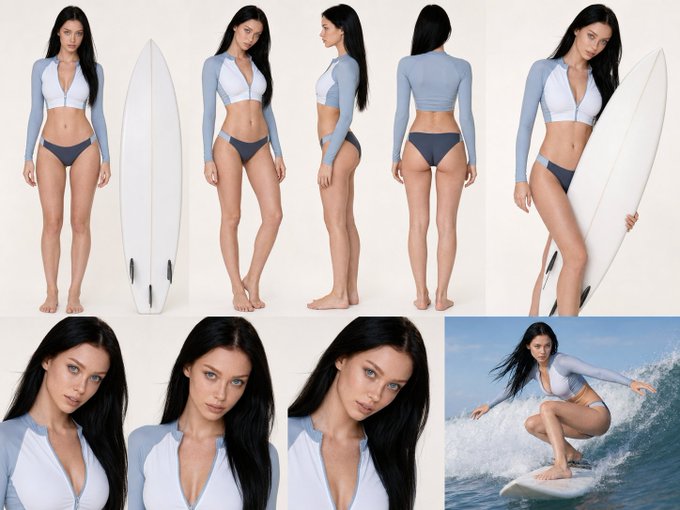
Directing AI video is no longer about rolling the dice on stochastic random generations. Modern generative cinematography demands precision camera control, reproducible focal lengths, and intentional lighting hierarchies. Inside Photon Studio, creators combine cutting-edge foundation models with structured multi-model pipelines to achieve Hollywood-grade visuals.
The Three Pillars of AI Cinematography
Achieving true cinematic quality requires treating the AI prompt not as a caption, but as a call-sheet for a virtual camera crew. The three primary variables every filmmaker must control are:
| Parameter | Traditional Filmmaking Analogy | Photon Studio Workflow |
|---|---|---|
| Camera Motion | Dolly, Crane, Steadicam, Orbit | Camera Angles Selector & Seedance 2.0 Motion Tokens |
| Lens Emulation | Anamorphic, 35mm, 50mm, 85mm prime | Focal Length prompts & InPaint Depth Mapping |
| Lighting Architecture | Key, Fill, Rim, Volumetric haze | Relighting Tool & Ambient Color Gradients |
Video Demonstration: Dynamic Camera Movement
Lighting Setup and Prompt Hierarchy
Lighting establishes mood, genre, and emotional weight. Rather than relying on generic adjectives like 'hyperrealistic' or 'photorealistic', describe the exact physical lighting instruments and their color temperatures:
Cinematic medium close-up, anamorphic 2.39:1 aspect ratio, 35mm Arri Alexa 65 sensor. Golden hour low-angle sunlight hitting camera-left as a warm 3200K rim light, cool 5600K ambient shadow fill, subtle volumetric atmospheric dust haze, shallow depth of field, natural skin texture.
"The breakthrough in generative cinema isn't higher pixel counts; it's temporal coherence and director intent across every cut."
— Varun Kuntoor (Photon Studio Keynote)
Using One Canvas for Character Continuity
One of the greatest challenges in AI video is keeping character faces and costumes consistent from shot to shot. In Photon Studio, you can construct a Character Consistency Sheet on the Canvas, run Relighting, and pass that node directly into Seedance 2.0 to preserve facial morphology across dynamic camera turns.